The CDN is a set servers around the world that cache and distribute static content to end users. The systems are provide through LearnShare and it's vendors (like Microsoft and Google). This system helps improve end-user performance in three key areas.
End-user requests for content are served by the closest server to them. As a result, requests travel shorter distances to request objects, significantly improving performance.
The CDN is designed for material with a low rate of change, and thus the content can be cached more aggressively when delivered to the end user. This enables increased performance for multiple requests to the same file, since the end user will likely have a copy of the object already present on their PC.
By offloading content to the CDN, modern browsers are able to simultaneously download content from the LearnShare platform and from the CDN. This allows end users to access material more quickly.
Servers, called "edge locations", exist in the following metro areas:
|
North America |
Europe |
Asia |
South America |
|---|---|---|---|
|
Ashburn, VA (2) Dallas/Fort Worth, TX(2) Hayward, CA Jacksonville, FL Los Angeles, CA (2) Miami, FL New York, NY (3) Newark, NJ Palo Alto, CA San Jose, CA Seattle, WA South Bend, IN St. Louis, MO |
Amsterdam, Netherlands (2) Dublin, Ireland Frankfurt, Germany (2) London, England (2) Madrid, Spain Milan, Italy Paris, France (2) Stockholm, Sweden |
Hong Kong, China (2) Osaka, Japan Seoul, Korea Singapore(2) Sydney, Australia Tokyo, Japan (2) |
São Paulo, Brazil |
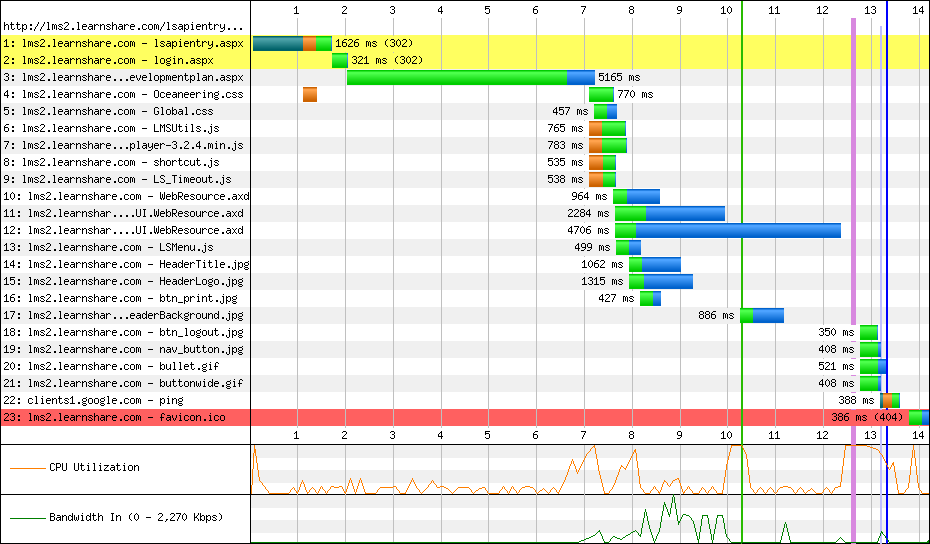
As an illustration of how this works, let's compare a user's experience opening a robust development plan (700+ items) from Israel, using the Chrome browser.
First, with the CDN disabled:
As you can see, the user spends nearly 13 seconds logging in, and accessing the development plan. Thanks to their browser's caching, they can repeat this process substantially faster (6.5 seconds) when they visit the site again.
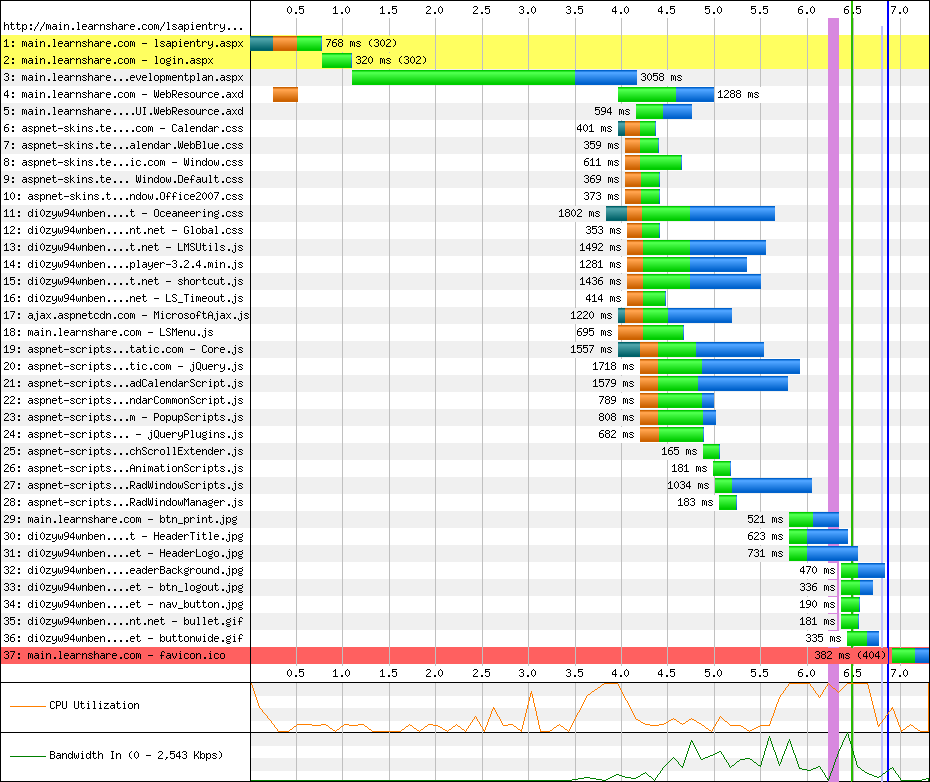
Once the CDN is enabled:

You can see a nearly a 50% improvement in initial load times, with subsequent visits showing very crisp response times. Note that "load times" also include authentication in via the LearnShare API.
The CDN improved performance in two ways.
First, by serving content from servers closer to the user, the user is able to download/access static content much more quickly than before. Our choice of Israel was purposeful, as there are currently no edge servers in the Middle East. Had we chosen to test from a location in London, where edge servers exist, the difference would be more dramatic.
Second, the browser can simultaneously load data from both the LMS system and the CDN -- also improving performance. This is reflected in the Waterfall graphs at the end of this document.
Absolutely not! LearnShare uses the CDN to store static content and artifacts -- things like images, or script files. These resources are required to render the page, or to add branding to the site. The actual data only ever exists in the LearnShare servers.
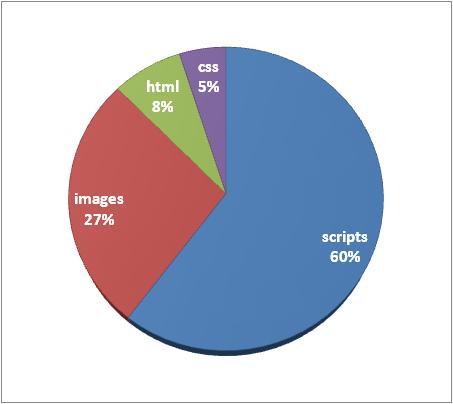
In the test above only 8% (23.5K) of the data, i.e. the actual page content of the development plan, was generated by the LearnShare environment.
Since static content is the bulk of a typical user's experience, and rarely changes, it can be more easily cached/referenced for users:
Any user/browser can use the CDN without changes. However, in some corporate environments we've noted much tighter security/firewall restrictions that resulted in our CDN sites being blocked. This causes pages that use the CDN to render incorrectly, or to fail entirely.
To ensure successful use of the CDN, check with your IT team to see if restrictions exist. If so, ensure the following sites are available, or "white-listed".
ajax.aspnetcdn.com/ajax/
www.google.com/jsapi
aspnet-scripts.telerikstatic.com
aspnet-skins.telerikstatic.com
cdn.learnshare.com
ajax.aspnetcdn.com/ajax/
www.google.com/jsapi
d2i2wahzwrm1n5.cloudfront.net
d35islomi5rx1v.cloudfront.net
di0zyw94wnben.cloudfront.net
Yes! We use Adobe’s Flash® Media Server (version 3.5) to deliver your content using the RTMP protocol and several of its variants.
Generally, streaming refers to proprietary protocols that are used to deliver audio and video to end users on the internet. These protocols are different than the HTTP protocol used to deliver web pages and other content because streaming protocols deliver content in real time – the end-users watch the bytes as they are delivered.
Streaming content has several potential benefits for you and your end-users. Streaming can give end-users more control over their viewing experience. For instance, it is easier for a viewer to seek forward in a video using streaming than using traditional download delivery. Streaming can also give you more control over your content, as no file remains on the end-user’s computer when they finish watching a video.
Note that you can only stream audio and video files – for other types of content, streaming does apply.